AI & Product Consultant
How to automate the manual work of title search
When someone buys a house, somebody has to verify that the seller actually owns it. That no hidden liens, past fraud, or paperwork mistakes are lurking in the property's history. That somebody is a title agent.
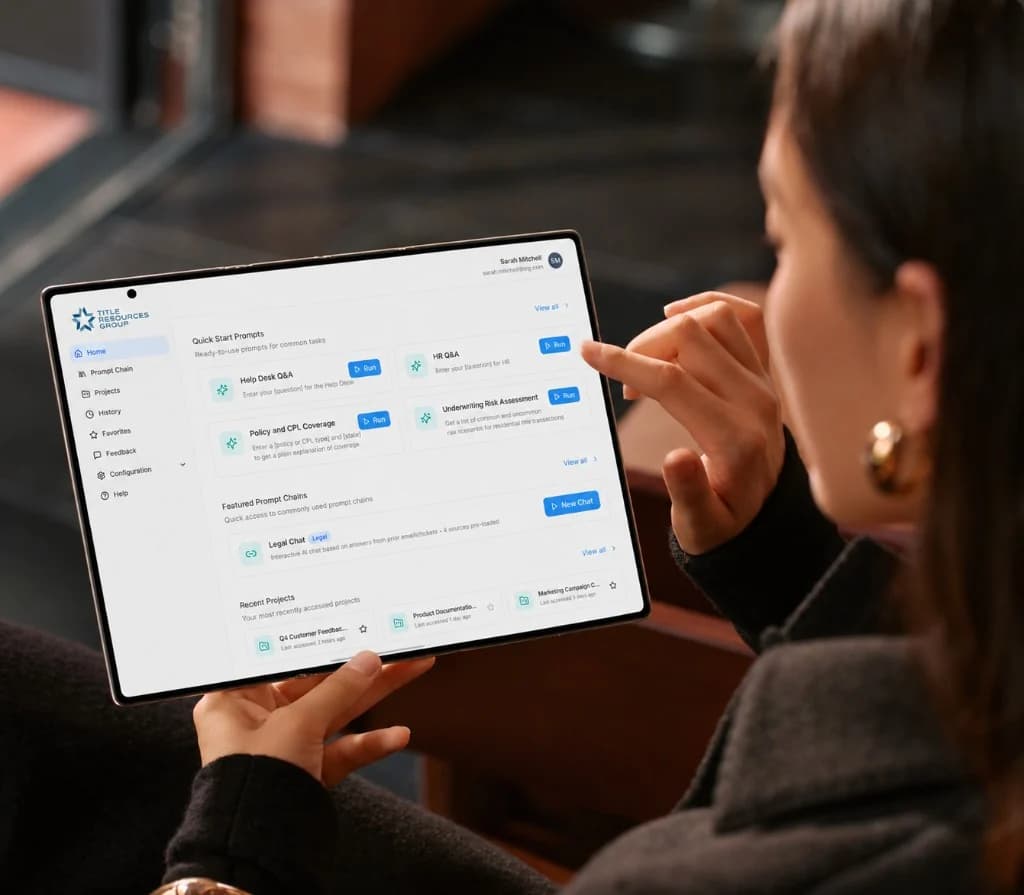
Title Resource Group serves title agents. Their workflow tool, TitleFlow, takes a title search order and turns it into a deliverable package: title report, supporting documents, invoice. The package goes back to the title agent so they can clear issues and close the deal.
Think of it as a factory for title search. Orders come in, documents get processed, packages go out.
- 30%
- of the annual cost target, already in production
- 3 weeks
- to the first production-ready product
- 99 / 100
- approvals before a step is fully automated
The scale of the manual work
Every single order can contain dozens of documents. Deeds. Mortgages. Tax records. Probates. Exceptions. Sometimes 40 or more documents land on one order.
And every state plays by different rules. Water rights in Nevada work nothing like Pennsylvania. Mobile home regulations shift county by county. A red flag in Florida might mean nothing in Ohio. There are hundreds of exam codes, and the right one depends on the document type, the state, and the transaction.
The operation processes thousands of orders per day in Pennsylvania alone.
Before AI, all of this was manual. An examiner would open a massive vendor package, a single PDF sometimes running over 100 pages, and split it by hand. They would read every document against a checklist. Compare legal descriptions. Plot boundary coordinates using an external tool called a deed plotter. Assign exam codes by browsing a library of hundreds. Flag anything suspicious.
Every order. Every day. A staggering amount of skilled but repetitive work.
The goal
Leadership had a clear target for the year: reduce operational costs by replacing manual effort with AI.
They had already calculated the number. They wanted AI to handle the repetitive work so the team could focus on judgment calls that actually require human expertise.
The ambition was matched by discipline. They did not want to flip a switch and automate everything overnight.
Human in the loop first
Other companies had tried jumping straight to full automation years earlier, and still had not reached the results this project has already delivered.
The approach here was different. Keep the human in the loop. Let AI do the work, but let the examiner verify. Track the accuracy. If 99 out of 100 results get approved, that step can be fully automated.
Experiment. Measure. Adjust. Expand only when the data says it is safe.
This philosophy shaped every decision that followed.
A prototype is not a product
A non-technical stakeholder had already built a prototype. A front-end-only tool with no database, no security, and no integration with actual orders. In their eyes, it was practically production-ready.
The logic was straightforward: we built this in two weeks, you are professionals, you should be able to do it in two days. That was the expectation.
The reality required explaining that a prototype is not a product. Production-ready means security, scalability, a real database, and integration with live order data. It means the tool works when thousands of people rely on it daily.
Then came the harder part: proving it by delivering fast.
Three weeks instead of six months
While explaining the gap between prototype and product, the team adopted AI tools across the entire development process. From UX design to code generation, AI accelerated every stage.
The UX designer gathered requirements, pushed them into Figma Make, and generated concept screens in hours. By the next day, designs were ready. The front-end team used Cursor, Claude, and Copilot for code generation. The backend team used Claude Sonnet and Cursor for feature development. A custom Rovo AI agent in Jira drafted and refined user stories from project documentation.
The first production-ready product shipped in three weeks.
AI was not just the product being built. It was how the product was built.
Ship fast, gather feedback, enhance
After the first delivery, interviews with end users were supposed to decide what to build next. They did not.
This was a new domain for the people being interviewed. They were not AI enthusiasts. They had never used AI tools. They had no idea what to expect, what AI could do, or what they wanted from it.
Discovery took longer than building the first prototype. The output was a set of vague points that leadership never confirmed or prioritized.
So the team stopped trying to extract requirements from people who could not yet imagine the product. Reduce time to market. Cover the critical functionality without overcomplicating it. Launch into production so real users start using the tool. Then gather feedback and improve based on real behavior, not hypothetical interviews.
That became the operating principle. Leadership provided a feature list, the team helped prioritize by business value, and delivery moved in focused increments.
What AI does on every order
Each capability targets one manual step. Each one is a focused prompt chain with defined inputs and structured outputs.
Document splitting
Orders arrive as a single vendor package, sometimes over 100 pages in one PDF. The AI reads page titles and content, categorizes every page, and splits the package into individual documents: deeds, mortgages, taxes, probates. Examiners used to do this by hand. Now it runs automatically, and every downstream step works with clean, categorized files.
Boundary mapping
Legal descriptions contain coordinates that describe a property's physical boundaries. The AI extracts that data and generates a visual PDF sketch. Examiners used to pull coordinates into an external deed plotter and compare the results. The chain has two stages: one parses the legal description, one plots the boundary. Users still compare the final output. The human stays in the loop.
Exam and search quality checks
The hardest problem. The AI reviews every document against a checklist: legal description accuracy, grammar, and red flags such as water rights, mobile homes, road easements, incorrect areas, and directional errors. Rules vary by state, document type, and transaction. Decision trees in the prompts walk the model through structured questions so the output stays consistent. Examiners used to run this checklist by hand for every document in every order.
Exam code generation
There are hundreds of exam codes. Each document needs the right code for its type and state. Examiners used to browse a code library and decide manually. The AI suggests the codes. The examiner reviews and approves.
Notifications
A bridge between the AI layer and TitleFlow, so users always know what is happening on both sides. The system was not redesigned. An AI extension was added, and users were moved toward it gradually.
Order chat
The newest capability. Users ask questions about any order and get answers drawn from actual order data through MCP tools. Not just status. Any order-related information.
Keeping the model honest
Reliability matters more than creativity when the documents are legal.
For quality checks, decision trees sit inside the prompts. The model does not freely reason about what might be a problem. It follows a path. Does this document mention mobile homes? If yes, check these rules for this document type. If no, move on. Every branch ends in a clear decision. The model asks the same questions every time. Predictable beats clever.
Prompt research started with the two highest-volume states, Pennsylvania and Florida, and used those as the baseline. Covering every edge case in every state from day one would have drowned the work in noise.
Tone mattered as much as accuracy. When the AI flagged issues by saying “this is incorrect,” examiners pushed back and negative feedback spiked. The fix was to rewrite everything as a suggestion. “We see this, but your title report mentions X. Worth a look.” Same information. A completely different reaction.
How AI communicates determines whether users adopt it or fight it.
A centralized AI engine
The AI does not live inside TitleFlow. It sits in a separate layer. Any system sends a request, the engine runs the prompt chain, and structured JSON comes back.
TitleFlow connects to it. The help desk is being integrated. Another internal project, SDA, connects next. One engine serves multiple platforms without duplicating the infrastructure.
For data access, the team built an MCP server. The model needs order details, delivery history, exam codes, and the rest of the business data that lives in TitleFlow. The server exposes those as tools. Adding a tool is a configuration change, not a code change.
Security uses a delegation token. The MCP server is on the public internet, and the data behind it is sensitive legal information. Instead of handing real credentials to the model, the system issues short-lived tokens with limited permissions. Read-only access to one folder, not the keys to the account. If a token leaks, the damage stays contained.
Some chains take 10 to 15 minutes. Execution moved from synchronous to asynchronous, so people keep working while the AI runs in the background.
When the primary provider had a four-hour outage, failover switched to a backup model and the service stayed up. The primary model was chosen for its strength in the legal domain. Resilience still means a fallback is always ready.
AI across the delivery cycle
AI tools became the standard way of working, not a side experiment. The client now uses the same framework internally.
A small team delivered at the pace of a much larger one. Three weeks instead of six months for the first product, then a steady stream of features after that.
Planning
A custom Rovo agent in Jira drafts and refines user stories from the project documentation.
Design
Figma Make turns requirements into concept screens and prototypes in hours. Design validation runs through structured evaluation reports.
Backend
Claude Sonnet and Cursor for code generation, bug fixes, and optimization. ChatGPT for solution design and smaller tasks.
Frontend
The Anima plugin converts Figma designs into component code. Copilot and Claude Sonnet handle generation. GPT supports architecture discussions.
Testing
AI-assisted test cases, bug analysis, defect management, and code review.
Results so far
The capabilities are live in TitleFlow. Every order flows through them.
The client has already reached 30% of the annual cost-saving target with what is in production.
The engine is still expanding. Help desk integration is underway. SDA is next. New prompt chains keep shipping from real user feedback.
The system was not rebuilt. An AI layer was added carefully, and users were moved toward it step by step, with proof at every stage.
What this project teaches
Human in the loop first
Full automation later. Track accuracy before removing the person. If 99 out of 100 results get approved, automate that step.
Ship fast, then learn
Traditional discovery failed because users could not imagine an AI product they had never seen. A working version in their hands taught more than months of interviews.
Build for ambiguity
The vision changed constantly. Requirements shifted weekly. The project name changed three times. A flexible system that could absorb the change was the option that worked.
Decompose the task
One focus per prompt. Constrain creativity when reliability matters. Decision trees beat open-ended reasoning for production work.
Suggest, do not accuse
Tone determines adoption. The same finding, written as a suggestion instead of a verdict, changed how examiners responded.
Use AI to build AI
Stories, prototypes, and code generation are what made a three-week delivery possible.
Security is a precondition
Delegation tokens, limited permissions, and protected endpoints belong in the first sprint.